

jdecorte-be/get-next-line
This projects is about creating a function that, allows to read a line ending with a newline character ('\n') from a file descriptor, without knowing its size beforehand.
Picture this: You're staring at a 10GB log file, and your program just crashed with an "out of memory" error. You tried to load the entire file at once. Bad idea.
What if I told you there's an elegant way to read files—even massive ones—line by line, without ever loading more than a few kilobytes into memory at a time?
Welcome to get_next_line, one of the most notorious (and enlightening) projects from 42 School. It's deceptively simple: read one line at a time from a file descriptor. But here's the catch—you can't just call read() and hope for the best. You need to maintain state between function calls, handle partial reads, and manage memory like a pro.
By the end of this article, you'll understand exactly how to build a function that can read files of any size, one line at a time, using nothing but static variables and smart buffer management.
Let's dive in.
The Big Picture
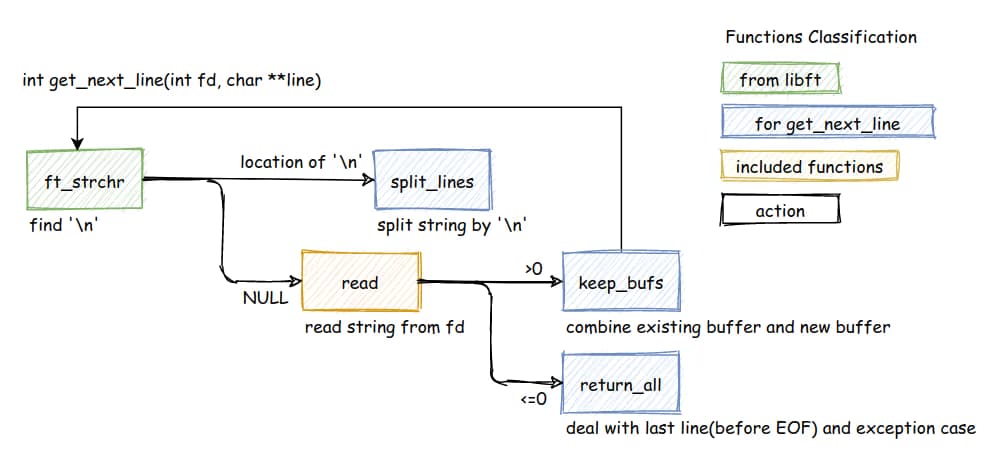
Before we get into the weeds, let's look at the overall architecture of how get_next_line works:
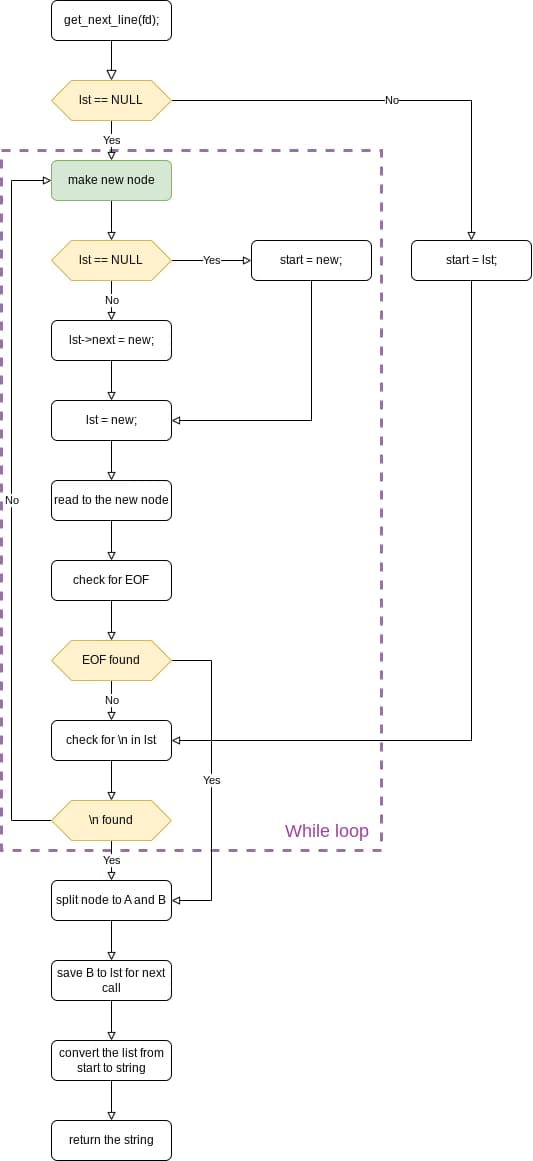
This flowchart shows the entire decision tree: checking for errors, reading data, searching for newlines, and handling both normal cases and edge cases like EOF. Keep this in mind as we explore each component.
Understanding File Descriptors
Before we dive into the implementation, let's quickly understand what file descriptors are and how they work at the operating system level.
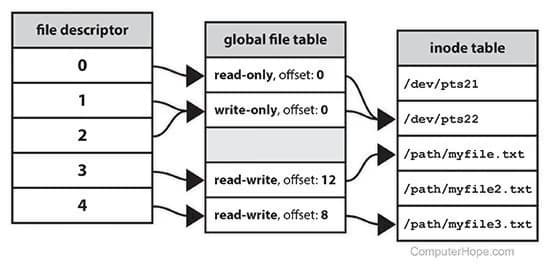
A file descriptor is just an integer that acts as a handle to an open file. When you open a file, the OS maintains a table that maps these integers to actual file objects. File descriptor 0 is standard input, 1 is standard output, and 2 is standard error. Any files you open get assigned numbers starting from 3.
What's crucial here is that each file descriptor maintains its own read position. When you read from a file descriptor, the OS remembers where you left off. The next read picks up right where the previous one stopped. This is fundamental to how get_next_line works—we're not constantly seeking around in the file; we're riding along with the natural flow of sequential reads.
The Secret Weapon: Static Variables
Here's the million-dollar question: How do you remember where you left off between function calls without using global variables or passing around context structs?
The answer is beautifully simple:
char *get_next_line(int fd)
{
    static char *buffer;
    // ... rest of the function
}
That single keyword—static—is doing all the heavy lifting.
Why Static Variables Are Perfect for This Job
Think of a static variable like a bookmark in a book. When you close the book and come back later, your bookmark is still there, waiting for you. That's exactly what happens with our static buffer.
Unlike regular variables that get wiped clean when a function exits, static variables stick around. They live for the entire duration of your program. Our buffer literally "remembers" what it was holding the last time you called the function.
Let's say you read "Hello\nWorld\nFoo" in one read operation. You extract "Hello\n" and return it. But what about "World\nFoo"? That stays in your static buffer! Next time you call get_next_line, it's already there, waiting to be processed. No need to re-read from the file.
And here's the beautiful part: if you read 1024 bytes but only need the first 100 to complete a line, the remaining 924 bytes don't disappear into the void. They're preserved in the static buffer for the next call. Efficient and elegant.
A Day in the Life of Our Static Buffer
Let's walk through a real example. Imagine we're reading a file with this content:
Hello, world!\nThis is a test.\nGoodbye!
On the first call, the buffer starts as NULL (static variables initialize to NULL). We allocate memory and read, say, 20 bytes: "Hello, world!\nThis i". We extract "Hello, world!\n" and return it. The buffer now holds: "This i" — the leftovers.
The second call is where things get interesting. The buffer already contains "This i" from last time. We read more data and append: "This is a test.\nGood". Now we have: "This is a test.\nGood". We extract and return "This is a test.\n", and the buffer holds just "Good".
On the final call, the buffer contains "Good". We read more: "bye!", so the buffer becomes "Goodbye!" (no newline at the end!). We hit EOF, return "Goodbye!" and free the buffer, setting it to NULL for good housekeeping.
See the pattern? The buffer is like a relay runner, passing the baton (leftover data) to itself for the next lap.
The Trade-offs (Because Nothing's Perfect)
Static variables are powerful, but they come with baggage.
This implementation uses a single static buffer, which means you can only read from one file descriptor at a time. Want to read from three files simultaneously? You're out of luck—unless you upgrade to an array of buffers indexed by fd, or use a hash map. (That's the bonus round of this project!)
The buffer also hangs around in memory until your program exits, even after you're done reading. For most programs, this is fine—we're talking kilobytes at most. But in long-running daemons or servers, it's worth being aware of.
And then there's thread safety. Static variables create shared state. If two threads call get_next_line at the same time, they'll step on each other's toes. In multi-threaded programs, you'll need mutexes or thread-local storage.
But for a single-threaded program reading one file? This approach is chef's kiss perfect.
The Implementation: Four Functions, One Mission
Now for the fun part—let's build this thing!
Our solution uses four functions working in harmony:
get_next_line— The conductor of our orchestraread_file— Reads chunks from the file until we have a complete lineft_line— Extracts the line we want to returnft_next— Updates the buffer with leftover data
Let's break down each one.
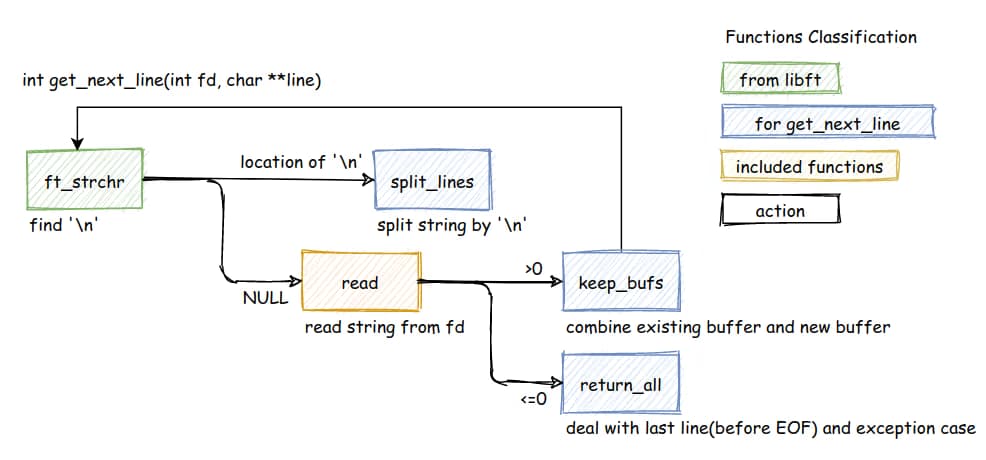
This diagram shows how our functions interact with each other and the flow of data through the system.
1. The Main Event: get_next_line
This is where it all happens. It's the only function your users will call.
char	*get_next_line(int fd)
{
	static char	*buffer;
	char		*line;

	if (fd < 0 || BUFFER_SIZE <= 0 || read(fd, 0, 0) < 0)
	{
		free(buffer);
		buffer = NULL;
		return (NULL);
	buffer = read_file(fd, buffer);
	if (!buffer)
		return (NULL);
	line = ft_line(buffer);
	buffer = ft_next(buffer);
	return (line);
}
What’s going on:
- Error Checking: Checks for invalid file descriptors, buffer size, or read errors.
- Reading: Calls
read_fileto ensurebuffercontains at least a full line (or the end of the file). - Extraction: Calls
ft_lineto allocate and return the line found in the buffer. - Cleanup: Calls
ft_nextto trim the extracted line from the static buffer, saving the remaining data for the next call.
2. The Buffer Combiner: keep_bufs
This function is responsible for combining the existing buffer with newly read data. It's called repeatedly until we have a complete line.
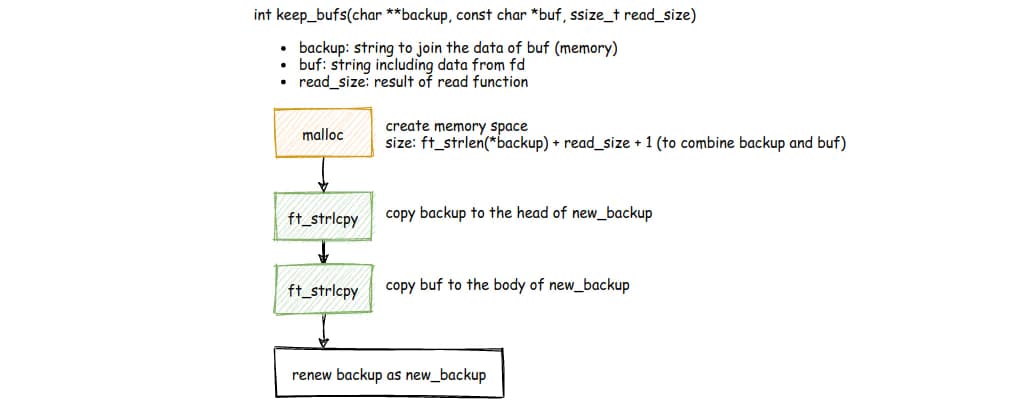
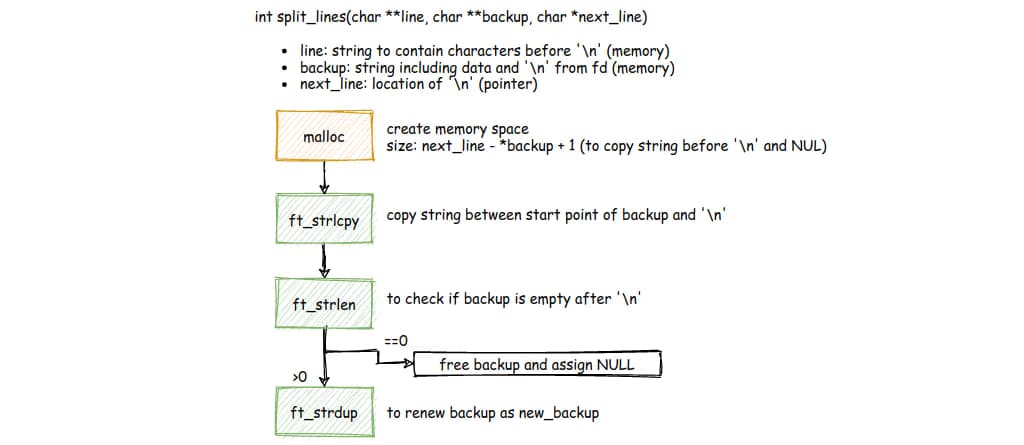
The diagrams show exactly what happens:
- malloc — Allocate space for the combined size:
strlen(backup) + read_size + 1 - ft_strlcpy — Copy the existing backup (leftover data) to the start of the new buffer
- ft_strlcpy — Append the newly read data (buf) to the end
- renew backup — Free the old backup and return the new combined buffer
This pattern ensures we never lose data. Every read operation appends to what we already have, building up until we find that crucial newline character.
3. The Edge Case Handler: return_all
When we hit EOF or encounter errors, we need special handling:
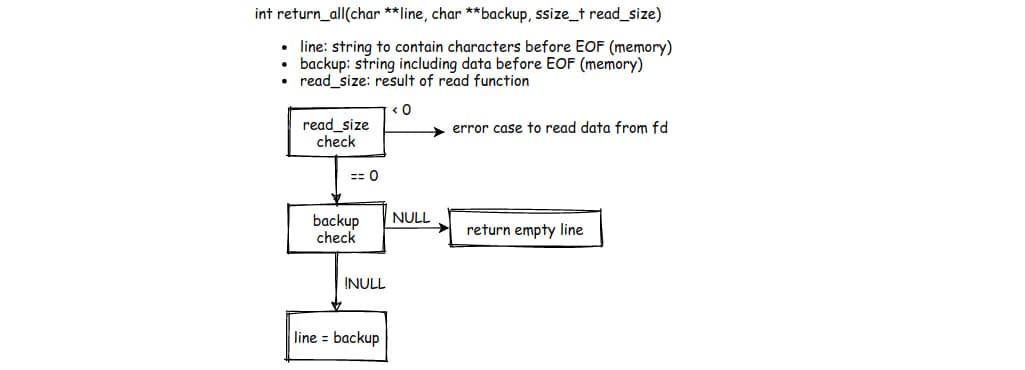
This function deals with three scenarios:
- read_size < 0 — Error reading from file descriptor; return NULL
- read_size == 0 && backup == NULL — End of file with no remaining data; return empty line
- read_size == 0 && backup != NULL — End of file but we have leftover data; assign it to line and return it
This is critical for files that don't end with a newline character. The last line still needs to be returned!
4. The Core Reading Loop
Here's a simplified version of the main reading logic:
char *read_file(int fd, char *res)
{
    char    *buffer;
    int     byte_read;

    if (!res)
        res = ft_calloc(1, 1);  // Start with an empty string

    buffer = ft_calloc(BUFFER_SIZE + 1, sizeof(char));  // +1 for '\0'
    byte_read = 1;

    while (byte_read > 0)
    {
        byte_read = read(fd, buffer, BUFFER_SIZE);

        if (byte_read == -1)  // Read error? Abort!
        {
            free(buffer);
            free(res);
            return (NULL);
        }

        buffer[byte_read] = 0;      // Null-terminate what we just read
        res = ft_free(res, buffer);  // Append to our result (uses keep_bufs logic)

        if (ft_strchr(buffer, '\n'))  // Found a newline? We're done!
            break;
    }

    free(buffer);
    return (res);
}
The Strategy:
Think of this like filling a bucket. You keep adding water (data) until you see it overflow (find a newline) or the well runs dry (EOF).
If res is NULL, we create an empty string to get started. Then we allocate a temporary buffer of BUFFER_SIZE bytes and call read(). This is way more efficient than reading one byte at a time!
Each chunk gets combined with what we already have using the keep_bufs pattern. As soon as we see a \n in the chunk we just read, we break. No point reading more if we have a complete line!
5. The Line Extractor & Buffer Trimmer
After we have a buffer containing at least one complete line (or EOF), we need to:
- Extract the line to return to the user
- Update the static buffer to contain only the leftovers
char *ft_line(char *buffer)
{
    char *line;
    int  i = 0;

    if (!buffer[i])
        return (NULL);

    // Count characters until newline
    while (buffer[i] && buffer[i] != '\n')
        i++;

    // Allocate: i chars + newline + null terminator
    line = ft_calloc(i + 2, sizeof(char));

    // Copy the line including the newline
    i = 0;
    while (buffer[i] && buffer[i] != '\n')
    {
        line[i] = buffer[i];
        i++;
    }

    if (buffer[i] == '\n')
        line[i] = '\n';

    return (line);
}

char *ft_next(char *buffer)
{
    int  i = 0;
    int  j = 0;
    char *new_buffer;

    // Find the newline
    while (buffer[i] && buffer[i] != '\n')
        i++;

    // No newline? Consumed everything
    if (!buffer[i])
    {
        free(buffer);
        return (NULL);
    }

    // Allocate for everything AFTER the newline
    new_buffer = ft_calloc((ft_strlen(buffer) - i + 1), sizeof(char));

    i++;  // Skip past '\n'
    while (buffer[i])
        new_buffer[j++] = buffer[i++];

    free(buffer);
    return (new_buffer);
}
The Critical Role:
This is what makes the static buffer work. After extracting a line, we trim the buffer down to just the unprocessed data. Next call? That data is already waiting in memory. No re-reading necessary. Memory efficient and fast.
6. The Split Function
One more critical piece—splitting the buffer at the newline:
char *split_lines(char *buffer)
{
    // Wrapper around ft_line that extracts
    // the current line from the buffer
    return ft_line(buffer);
}
This is often implemented as part of ft_line or as a separate function depending on your approach. The key idea: locate the \n, split there, return the line, and save the rest.
The diagram shows the complete overview of how all pieces fit together:
- We search for
\nusingft_strchr - If not found, we
readmore data - When read returns data (
>0), we usekeep_bufsto combine buffers - When read hits EOF or error (
<=0), we usereturn_allto handle the final line - Once we have a newline,
split_linesbreaks it into "line to return" and "leftovers to save"
This architecture ensures we never lose data and handle all edge cases gracefully.
Wrapping Up: What You Just Learned
If you made it this far, congrats! You now understand one of the most elegant solutions to a deceptively tricky problem.
Here's what makes get_next_line so brilliant: You learned how to use static to maintain state between function calls—no globals, no complex context structs, just a single keyword that does exactly what you need. You saw how to allocate, reallocate, and free memory without leaking a single byte, trimming buffers as you go to keep your memory footprint lean and mean.
Reading in chunks (not byte-by-byte) is the difference between a fast program and a slow one. You're reading BUFFER_SIZE bytes at a time and managing partial reads like a pro. And each function has one job and does it well: Read. Extract. Update. This separation of concerns makes the code readable, testable, and maintainable.
Why This Matters
The techniques you learned here aren't just for reading files. They're the foundation for building parsers (JSON, CSV, config files, you name it), network protocols (reading data from sockets line by line), and stream processing (handling data that's too big to fit in memory). Any system that deals with continuous input can benefit from these patterns.
Plus, you're now thinking like a systems programmer. You're conscious of memory, aware of I/O costs, and comfortable with state management.
Go Build Something
Now that you understand get_next_line, here are some challenges:
- Handle multiple file descriptors — Modify it to track multiple files at once using an array or hash map
- Make it thread-safe — Add mutexes or use thread-local storage
- Add binary file support — Handle files that contain null bytes
- Benchmark it — Compare performance with different
BUFFER_SIZEvalues
The best way to solidify this knowledge? Build something with it. Read a massive log file. Parse a CSV. Process some data that would normally bring your program to its knees.
You've got this.
If you found this helpful, drop a comment below! What would you build with get_next_line? Got questions about the implementation? Let me know!