

jdecorte-be/minishell
A 42 school project to create a simple shell interpreter in C. Recreates core bash functionalities like pipes, redirections, and built-in commands.
Introduction
Ever wondered how your terminal shell actually works? How does it parse commands, execute programs, handle pipes, and manage processes? Minishell is a 42 school project that challenges you to build your own mini version of Bash from scratch in C. It's an incredible journey into the depths of Unix systems programming.
This project implements a functional shell program that handles command parsing and execution, pipes and redirections, environment variable expansion, built-in commands (cd, echo, pwd, export, unset, env, exit), signal handling (Ctrl-C, Ctrl-D, Ctrl-), and process management with proper cleanup.
In this article, I'll walk through the key concepts and implementation challenges of building a shell, from understanding processes and pipes to handling signals and building command pipelines.
Project Overview
Minishell is a miniature shell program based on Bash that supports:
Core Features: The shell provides an interactive prompt with command history (up and down arrows), executes both system executables from the environment (ls, cat, grep, etc.) and local executables (./minishell), and includes builtin commands with their essential options. It supports pipes (|) for chaining commands, redirections (>, >>, <, <<), environment variable expansion ($USER, $VAR), exit status tracking ($?), and signal handling for user interrupts.
Limitations: The project intentionally doesn't support backslashes, semicolons, logical operators (&&, ||), or wildcards to keep the scope manageable while still covering the fundamental concepts.
Understanding Processes
Before diving into implementation, let's understand what processes are and how they work.
What is a Process?
A process is a program in execution. When you run a program, the system loads its instructions into RAM and executes them. The operating system manages all processes and allocates memory to each one independently—each has its own stack, heap, and instruction pointer.
You can view active processes with:
ps aux
Each process has a PID (Process Identifier), which is a unique non-negative integer, and a PPID (Parent Process Identifier) that references the parent process.
Processes are organized hierarchically. At startup, Unix has just one process called init (PID 1), which is the direct or indirect ancestor of all other processes.
Fork: Creating a Child Process
The fork() system call creates a new process by cloning the current one:
#include <unistd.h>

pid_t fork(void);
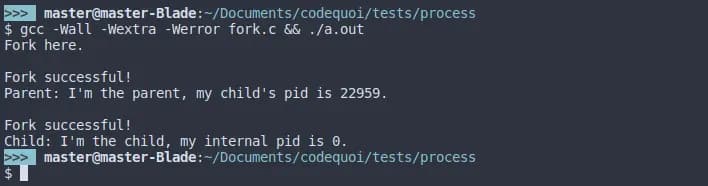
The return value is crucial: in the parent process, it returns the child's PID; in the child process, it returns 0; and on error, it returns -1.
Here's a basic example:
#include <unistd.h>
#include <stdio.h>

int main(void)
{
    pid_t pid;

    printf("Before fork\n");

    pid = fork();

    if (pid == -1)
    {
        perror("fork failed");
        return 1;
    }
    else if (pid == 0)
    {
        // Child process
        printf("I'm the child, PID: %d\n", getpid());
    }
    else
    {
        // Parent process
        printf("I'm the parent, child PID: %d\n", pid);
    }

    return 0;
}
Important: The child inherits the parent's instruction pointer, so it doesn't start from the beginning—it continues from where fork() was called!
Memory: Duplicated but Not Shared
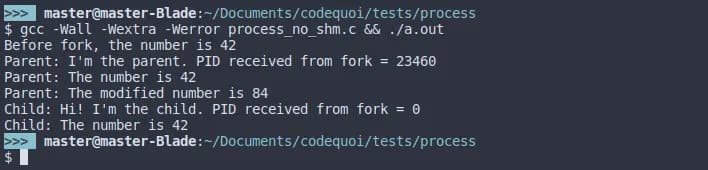
When you fork, the child gets a copy of the parent's memory, not a shared reference. Changes made in one process don't affect the other:
int main(void)
{
    int value = 42;
    pid_t pid;

    pid = fork();

    if (pid == 0)
    {
        value = 100;  // Child changes value
        printf("Child: value = %d\n", value);
    }
    else
    {
        sleep(1);  // Wait for child to finish
        printf("Parent: value = %d\n", value);  // Still 42!
    }

    return 0;
}
This isolation is why we need inter-process communication mechanisms like pipes.
Wait: Managing Child Processes
After creating a child process, the parent should wait for it to finish. Otherwise, you can get zombie processes—terminated children whose exit status hasn't been collected.
When a parent doesn't wait for its children, they become zombies:

Conversely, if a parent exits before waiting, children become orphans and are adopted by init:
The wait() and waitpid() Functions
#include <sys/wait.h>

pid_t wait(int *status);
pid_t waitpid(pid_t pid, int *status, int options);
wait() waits for any child process to terminate.
waitpid() offers more control with three parameters: pid (specific child to wait for, or -1 for any child), status (pointer to store the exit status), and options (flags like WNOHANG to return immediately if child hasn't exited).
Analyzing Exit Status
Use these macros to examine the status:
if (WIFEXITED(status))
{
    // Child exited normally
    int exit_code = WEXITSTATUS(status);
    printf("Exit code: %d\n", exit_code);
}

if (WIFSIGNALED(status))
{
    // Child was terminated by a signal
    int signal = WTERMSIG(status);
    printf("Terminated by signal: %d\n", signal);
}
Example: Proper Child Process Management
#include <unistd.h>
#include <sys/wait.h>
#include <stdio.h>
#include <stdlib.h>

int main(void)
{
    pid_t pid;
    int status;

    pid = fork();

    if (pid == 0)
    {
        // Child process
        printf("Child: Working...\n");
        sleep(2);
        exit(42);
    }
    else
    {
        // Parent process
        printf("Parent: Waiting for child...\n");
        waitpid(pid, &status, 0);

        if (WIFEXITED(status))
        {
            printf("Parent: Child exited with code %d\n",
                   WEXITSTATUS(status));
        }
    }

    return 0;
}
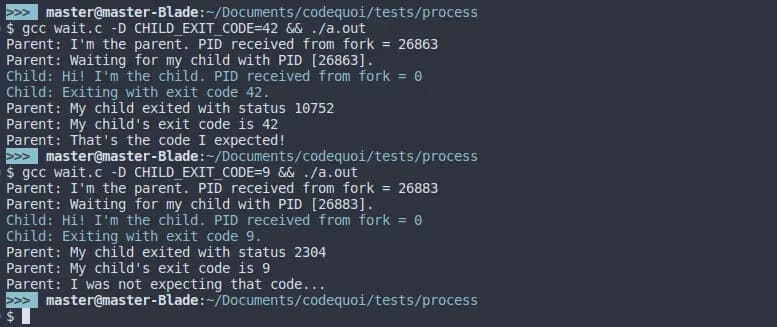
Here's what the output looks like when analyzing exit status:

And here's a comparison with different exit codes:
Pipes: Inter-Process Communication
Pipes are the foundation of shell command chaining. They allow one process's output to become another's input.
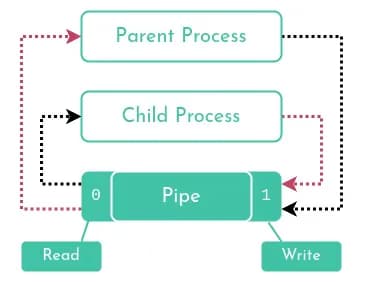
What is a Pipe?
A pipe is a unidirectional communication channel with a read end (file descriptor) and a write end (file descriptor).
Data written to the write end is buffered until read from the read end.
Creating a Pipe
#include <unistd.h>

int pipe(int pipefd[2]);
The pipefd array will contain pipefd[0] (the read end) and pipefd[1] (the write end).
Basic Pipe Example
#include <unistd.h>
#include <stdio.h>
#include <string.h>

int main(void)
{
    int pipefd[2];
    pid_t pid;
    char buffer[100];

    if (pipe(pipefd) == -1)
    {
        perror("pipe");
        return 1;
    }

    pid = fork();

    if (pid == 0)
    {
        // Child reads from pipe
        close(pipefd[1]);  // Close write end
        read(pipefd[0], buffer, sizeof(buffer));
        printf("Child received: %s\n", buffer);
        close(pipefd[0]);
    }
    else
    {
        // Parent writes to pipe
        close(pipefd[0]);  // Close read end
        char *msg = "Hello from parent!";
        write(pipefd[1], msg, strlen(msg) + 1);
        close(pipefd[1]);
        wait(NULL);
    }

    return 0;
}

Critical: Close Unused File Descriptors!
This is crucial and often the source of bugs. Each process must close the pipe ends it doesn't use: if all write ends aren't closed, read() will wait indefinitely instead of returning EOF, and if all read ends aren't closed, write() will block when the pipe is full.
// Parent writes to pipe
close(pipefd[0]);  // MUST close unused read end
write(pipefd[1], data, size);
close(pipefd[1]);  // MUST close when done

// Child reads from pipe
close(pipefd[1]);  // MUST close unused write end
read(pipefd[0], buffer, size);
close(pipefd[0]);  // MUST close when done
If you forget to close unused file descriptors, you'll see output like this where the process hangs indefinitely:

Implementing the Shell's Pipe Operator
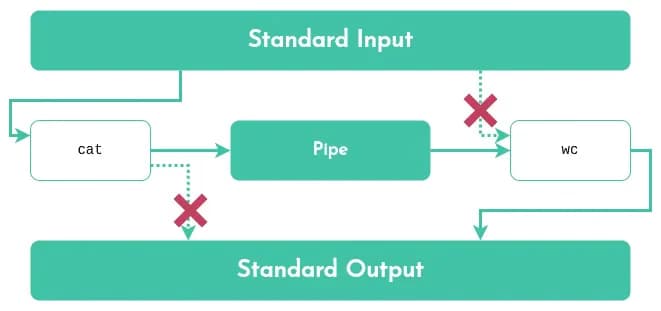
When you run cat file.txt | wc -l, the shell:
- Creates a pipe
- Forks two child processes
- Redirects the first command's stdout to the pipe's write end
- Redirects the second command's stdin to the pipe's read end
Using dup2() to redirect file descriptors:
int pipefd[2];
pipe(pipefd);

// First command: cat file.txt
if (fork() == 0)
{
    close(pipefd[0]);              // Close read end
    dup2(pipefd[1], STDOUT_FILENO); // Redirect stdout to pipe
    close(pipefd[1]);
    execlp("cat", "cat", "file.txt", NULL);
}

// Second command: wc -l
if (fork() == 0)
{
    close(pipefd[1]);              // Close write end
    dup2(pipefd[0], STDIN_FILENO); // Redirect stdin from pipe
    close(pipefd[0]);
    execlp("wc", "wc", "-l", NULL);
}

// Parent closes all pipe ends and waits
close(pipefd[0]);
close(pipefd[1]);
wait(NULL);
wait(NULL);
Here's a visual representation of how the shell's pipe operator works:

Building Pipelines
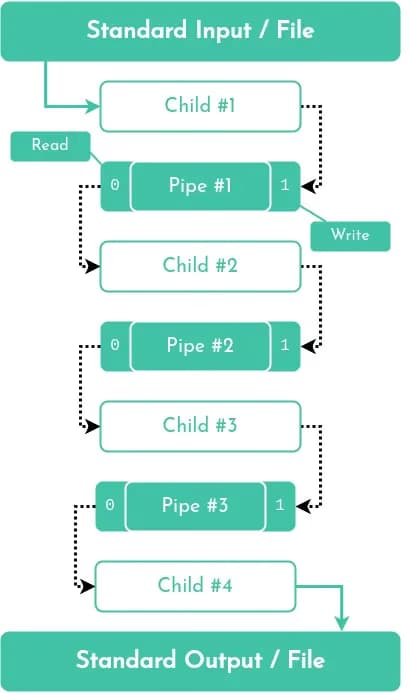
A pipeline like cmd1 | cmd2 | cmd3 requires multiple pipes. The pattern is that N commands require N-1 pipes, and each middle command reads from one pipe and writes to the next.
cmd1 --> pipe1 --> cmd2 --> pipe2 --> cmd3
Key implementation points:
- Create all pipes before forking
- Each child closes all pipe ends it doesn't use
- First command only writes, last command only reads
- Middle commands both read and write
// For 3 commands, need 2 pipes
int pipe1[2], pipe2[2];
pipe(pipe1);
pipe(pipe2);

// Command 1: only writes to pipe1
if (fork() == 0)
{
    dup2(pipe1[1], STDOUT_FILENO);
    close(pipe1[0]);
    close(pipe1[1]);
    close(pipe2[0]);
    close(pipe2[1]);
    // Execute command 1
}

// Command 2: reads from pipe1, writes to pipe2
if (fork() == 0)
{
    dup2(pipe1[0], STDIN_FILENO);
    dup2(pipe2[1], STDOUT_FILENO);
    close(pipe1[0]);
    close(pipe1[1]);
    close(pipe2[0]);
    close(pipe2[1]);
    // Execute command 2
}

// Command 3: only reads from pipe2
if (fork() == 0)
{
    dup2(pipe2[0], STDIN_FILENO);
    close(pipe1[0]);
    close(pipe1[1]);
    close(pipe2[0]);
    close(pipe2[1]);
    // Execute command 3
}

// Parent closes all pipes and waits
close(pipe1[0]);
close(pipe1[1]);
close(pipe2[0]);
close(pipe2[1]);
// Wait for all children
Signal Handling
Shells need to handle user interrupts gracefully. When you press Ctrl-C, you don't want to exit the shell—just the current command.
Understanding Signals
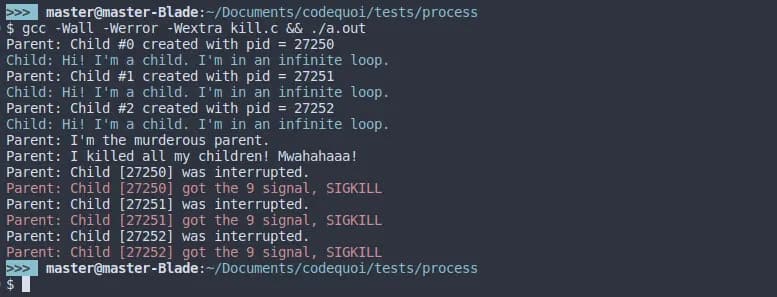
A signal is an asynchronous notification sent to a process. Common signals include SIGINT (2, Interrupt via Ctrl-C), SIGQUIT (3, Quit via Ctrl-), SIGTERM (15, Termination request), SIGKILL (9, Force kill that cannot be caught!), and SIGSTOP (19, Stop process that cannot be caught!).
Here's a visual representation of how signals work at the system level:
It's important to understand that signals can be pending. When a signal is blocked, it becomes pending until it's unblocked:
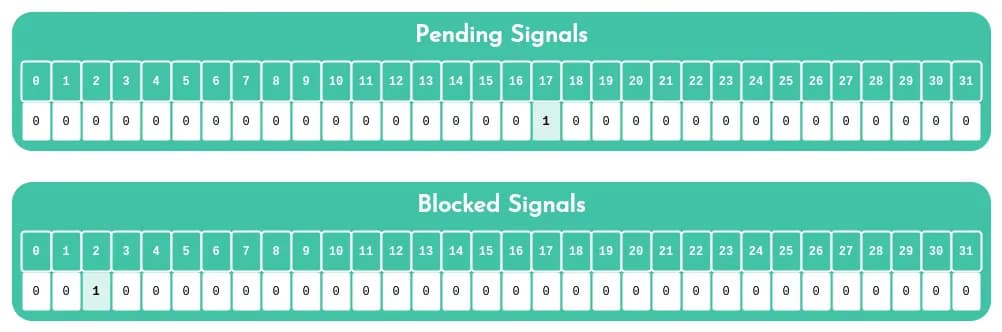
Important: There can only be one pending signal of any particular type. If multiple signals of the same type are sent while blocked, only one will be delivered when unblocked.
The sigaction() Function
The modern way to handle signals is with sigaction():
#include <signal.h>

struct sigaction {
    void (*sa_handler)(int);      // Handler function
    sigset_t sa_mask;             // Signals to block during handler
    int sa_flags;                 // Flags (e.g., SA_RESTART)
};

int sigaction(int signum, const struct sigaction *act,
              struct sigaction *oldact);
Basic Signal Handler Example
#include <signal.h>
#include <stdio.h>
#include <unistd.h>

void handle_sigint(int sig)
{
    write(STDOUT_FILENO, "\nCaught SIGINT!\n", 16);
}

int main(void)
{
    struct sigaction sa;

    sa.sa_handler = handle_sigint;
    sigemptyset(&sa.sa_mask);
    sa.sa_flags = SA_RESTART;

    if (sigaction(SIGINT, &sa, NULL) == -1)
    {
        perror("sigaction");
        return 1;
    }

    printf("Press Ctrl-C to test (Ctrl-\\ to quit)...\n");

    while (1)
        sleep(1);

    return 0;
}
Example output showing signal handling:

Signal Safety Rules
Signal handlers are tricky! Follow these rules:
- Keep handlers short and simple - Just set a flag if possible
- Use only async-signal-safe functions - No
printf(),malloc(), etc.! - Save and restore errno - Handlers can interfere with error handling
- Block signals when accessing shared data
- Use
volatile sig_atomic_tfor flag variables
Safe functions include: write(), _exit(), signal(), kill(), and a few others. Check the signal-safety(7) man page.
Minishell Signal Behavior
In Minishell, the expected behavior is:
The shell needs to behave as follows: Ctrl-C (SIGINT) displays a new prompt line (interrupt current command), Ctrl-D exits the shell (EOF), and Ctrl-\ (SIGQUIT) does nothing (ignore).
In the parent shell process:
void setup_signals(void)
{
    struct sigaction sa;

    // Handle SIGINT
    sa.sa_handler = handle_sigint;
    sigemptyset(&sa.sa_mask);
    sa.sa_flags = SA_RESTART;
    sigaction(SIGINT, &sa, NULL);

    // Ignore SIGQUIT
    sa.sa_handler = SIG_IGN;
    sigaction(SIGQUIT, &sa, NULL);
}

void handle_sigint(int sig)
{
    (void)sig;
    write(STDOUT_FILENO, "\n", 1);
    rl_on_new_line();      // Readline function
    rl_replace_line("", 0); // Clear current line
    rl_redisplay();        // Redisplay prompt
}
In child processes executing commands, restore default signal handling:
signal(SIGINT, SIG_DFL);
signal(SIGQUIT, SIG_DFL);
Blocking Signals
Sometimes you need to block signals temporarily:
sigset_t set;
sigemptyset(&set);
sigaddset(&set, SIGINT);

// Block SIGINT
sigprocmask(SIG_BLOCK, &set, NULL);

// Critical section here

// Unblock SIGINT
sigprocmask(SIG_UNBLOCK, &set, NULL);
Here's an example demonstrating signal blocking in action:
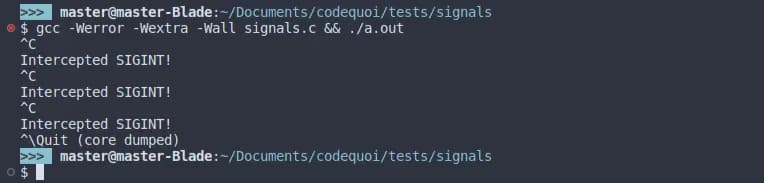
And what happens when a blocked signal is unblocked (notice how the pending signal is delivered immediately):

Redirections
Shells support redirecting input and output:
The shell supports four redirection operators: > (redirect output, overwrite), >> (redirect output, append), < (redirect input), and << (here-document, read until delimiter).
Output Redirection: >
int fd = open("output.txt", O_WRONLY | O_CREAT | O_TRUNC, 0644);
if (fd == -1)
{
    perror("open");
    return 1;
}

dup2(fd, STDOUT_FILENO);  // Redirect stdout to file
close(fd);

// Now all output goes to output.txt
printf("This goes to the file\n");
Append Redirection: >>
int fd = open("output.txt", O_WRONLY | O_CREAT | O_APPEND, 0644);
dup2(fd, STDOUT_FILENO);
close(fd);
Input Redirection: <
int fd = open("input.txt", O_RDONLY);
if (fd == -1)
{
    perror("open");
    return 1;
}

dup2(fd, STDIN_FILENO);  // Redirect stdin from file
close(fd);

// Now reads come from input.txt
char buffer[100];
read(STDIN_FILENO, buffer, sizeof(buffer));
Here-Document: <<
A here-document reads input until a delimiter is reached:
cat << EOF
Line 1
Line 2
EOF
Implementation approach:
- Display a prompt for each line
- Read user input
- Stop when delimiter is encountered
- Store all lines in a temporary file or pipe
- Redirect stdin from that source
// Simplified here-doc implementation
int pipefd[2];
pipe(pipefd);

// Read until delimiter
char *line;
while ((line = readline("> ")))
{
    if (strcmp(line, delimiter) == 0)
        break;
    write(pipefd[1], line, strlen(line));
    write(pipefd[1], "\n", 1);
    free(line);
}

close(pipefd[1]);
dup2(pipefd[0], STDIN_FILENO);
close(pipefd[0]);
Environment Variables
Shells maintain environment variables and expand them in commands.
Accessing the Environment
The environment is available through:
// Global variable
extern char **environ;

// Or passed to main
int main(int argc, char **argv, char **envp)
Each environment entry is a string: "NAME=value"
Expanding Variables
When you see $USER in a command, the shell should:
- Extract the variable name
- Look it up in the environment
- Replace
$USERwith its value
char *get_env_value(char *name, char **env)
{
    int i = 0;
    size_t len = strlen(name);

    while (env[i])
    {
        if (strncmp(env[i], name, len) == 0 && env[i][len] == '=')
            return &env[i][len + 1];
        i++;
    }
    return NULL;
}
Special Variables
The shell handles two special variables: $? (exit status of last command) and $$ (current shell's PID).
These require special handling during parsing.
Builtin Commands
Some commands must be executed by the shell itself (not in a child process) because they affect the shell's state.
cd - Change Directory
int builtin_cd(char **args)
{
    char *path = args[1];

    if (!path)
        path = getenv("HOME");

    if (chdir(path) != 0)
    {
        perror("cd");
        return 1;
    }

    return 0;
}
export - Set Environment Variable
int builtin_export(char **args, char ***env)
{
    if (!args[1])
    {
        // Print all environment variables
        print_env(*env);
        return 0;
    }

    // Add/update variable
    char *name = args[1];
    // Parse NAME=value format
    // Update environment

    return 0;
}
exit - Exit Shell
int builtin_exit(char **args)
{
    int exit_code = 0;

    if (args[1])
        exit_code = atoi(args[1]);

    exit(exit_code);
}
Other builtins: pwd, env, unset, echo -n
Parsing: Lexer and Parser
Building a shell requires parsing user input into a command structure. This typically involves:
Lexer (Tokenization)
Break input into tokens:
Input: ls -la | grep txt > output.txt
Tokens: [ls] [-la] [|] [grep] [txt] [>] [output.txt]
Parser (Syntax Analysis)
Build a command structure:
typedef struct s_redir
{
    int type;           // <, >, <<, >>
    char *file;
    struct s_redir *next;
} t_redir;

typedef struct s_cmd
{
    char **args;        // Command and arguments
    t_redir *redirs;    // List of redirections
    struct s_cmd *next; // Next command in pipeline
} t_cmd;
Parse the tokens into this structure, handling quotes (single and double), variable expansion, whitespace, and special characters.
Execution Flow
Putting it all together:
while (1)
{
    // 1. Display prompt
    char *line = readline("minishell$ ");
    if (!line)
        break;  // Ctrl-D

    // 2. Add to history
    add_history(line);

    // 3. Parse input
    t_cmd *cmd = parse_line(line);

    // 4. Execute command
    if (is_builtin(cmd))
        execute_builtin(cmd);
    else
        execute_pipeline(cmd);

    // 5. Cleanup
    free_cmd(cmd);
    free(line);
}
The execute_pipeline() function:
void execute_pipeline(t_cmd *cmds)
{
    int num_cmds = count_commands(cmds);
    int pipes[num_cmds - 1][2];

    // Create all pipes
    for (int i = 0; i < num_cmds - 1; i++)
        pipe(pipes[i]);

    // Fork and execute each command
    t_cmd *current = cmds;
    for (int i = 0; i < num_cmds; i++)
    {
        if (fork() == 0)
        {
            // Setup redirections for this command
            if (i > 0)  // Not first command
                dup2(pipes[i-1][0], STDIN_FILENO);
            if (i < num_cmds - 1)  // Not last command
                dup2(pipes[i][1], STDOUT_FILENO);

            // Close all pipe fds
            close_all_pipes(pipes, num_cmds - 1);

            // Apply redirections from command
            apply_redirections(current->redirs);

            // Execute
            execve(current->args[0], current->args, environ);
            exit(1);
        }
        current = current->next;
    }

    // Parent closes all pipes and waits
    close_all_pipes(pipes, num_cmds - 1);
    for (int i = 0; i < num_cmds; i++)
        wait(NULL);
}
Key Challenges and Solutions
1. Memory Leaks
With all the forking and string manipulation, leaks are easy. Use Valgrind religiously, free everything in both parent and child paths, and be especially careful with readline's returned strings.
2. File Descriptor Leaks
Unclosed file descriptors accumulate and cause mysterious bugs. Track all opens/pipes with a list, close in both parent and child, and use lsof -p <pid> to debug.
3. Zombie Processes
Children not properly waited for become zombies. Always wait() or waitpid() for children, and use WNOHANG if you need non-blocking checks.
4. Race Conditions
With multiple processes and signals, block signals during critical sections, use proper signal-safe functions, and be careful with shared resources.
5. Quote Handling
Quotes are surprisingly complex:
echo "Hello $USER"   # Expands variables
echo 'Hello $USER'   # Literal string
echo "He said 'hi'"  # Nested quotes
Implement a state machine to track quote context.
Testing and Debugging
Testers
Several community testers exist: minishell_tester and 42_minishell_tester.
Debugging Tips
- Start simple: Get basic command execution working first
- Test incrementally: Add one feature at a time
- Compare with bash: Run the same command in bash and your shell
- Use strace: See all system calls:
strace -f ./minishell - Check with valgrind:
valgrind --leak-check=full --track-fds=yes ./minishell
Edge Cases
Test edge cases like empty input, commands with only whitespace, unclosed quotes, invalid redirections, permission errors, non-existent commands, and signal delivery during system calls.
Lessons Learned
Building Minishell taught me:
- Systems programming is hard but rewarding - You gain deep appreciation for shells
- Error handling is crucial - Every system call can fail
- Resource management matters - File descriptors and memory are precious
- RTFM - Man pages become your best friend
- Testing is essential - Edge cases will break your shell
The project forces you to understand how processes actually work, the beauty and complexity of Unix pipes, why signal handling is so tricky, and what shells do when you type commands.
Conclusion
Minishell is more than just a project—it's a deep dive into Unix fundamentals. By building a shell from scratch, you gain intimate knowledge of process creation and management, inter-process communication, signal handling, file descriptors and I/O redirection, and command parsing and execution.
Every time you open a terminal now, you'll understand what's happening under the hood. You'll appreciate the elegance of Unix's pipe philosophy and the complexity involved in making it all work seamlessly.
The skills learned here transfer directly to systems programming, understanding how tools like Docker and systemd work, and building more complex concurrent applications.
If you're working on Minishell or a similar project, embrace the challenge. Debug patiently, test thoroughly, and don't be afraid to dive deep into man pages. The frustration is temporary, but the knowledge is permanent.
Happy shell building! 🐚
Resources
Key resources include the GNU Bash Manual, man pages (man bash, man fork, man pipe, man signal), The Linux Programming Interface by Michael Kerrisk, Advanced Programming in the UNIX Environment by Stevens & Rago, and the Minishell Tutorial Series.