

jdecorte-be/webserv
A from-scratch HTTP/1.1 web server in C++98. This 42 school project handles concurrent clients with select(), parses requests, and supports CGI for dynamic cont
Introduction
Have you ever wondered what happens behind the scenes when you type a URL into your browser? Or how servers like NGINX and Apache handle thousands of concurrent connections? I recently completed Webserv, a 42 school project where I built a fully functional HTTP/1.1 web server from scratch using C++98—no external libraries, just raw sockets and systems programming.
This wasn't just an academic exercise. By the end of this project, I had a web server capable of:
- Handling concurrent client connections using I/O multiplexing
- Parsing and responding to HTTP/1.1 requests
- Serving static files (HTML, CSS, images, videos)
- Executing CGI scripts for dynamic content
- Managing file uploads
- Supporting custom configurations similar to NGINX
In this article, I'll walk you through the journey of building this server, the challenges I faced, and the key concepts that make modern web servers tick.
Understanding the Foundation: HTTP and TCP
Before diving into implementation, let's understand what we're building.
What is HTTP?
HTTP (Hypertext Transfer Protocol) is the foundation of data communication on the web. It's a request-response protocol that operates over TCP connections. When you visit a website:
- Your browser (client) sends an HTTP request to the server
- The server processes the request
- The server sends back an HTTP response
The Anatomy of HTTP Messages
Every HTTP message follows a specific format:
start-line CRLF
Headers CRLF
CRLF (end of headers)
[message-body]
HTTP Request Example:
GET /index.html HTTP/1.1
Host: localhost:8080
User-Agent: Mozilla/5.0 (Windows NT 10.0; Win64; x64)
HTTP Response Example:
HTTP/1.1 200 OK
Content-Type: text/html
Content-Length: 1234

<html>...</html>
The request line consists of three parts:
- Method: The action to perform (GET, POST, DELETE, etc.)
- URI: The resource path
- HTTP Version: Usually HTTP/1.1
The Architecture: Building Blocks of a Web Server
A web server is like a well-orchestrated symphony, with different components working in harmony. Here's how I structured mine:
1. Server Core: The Networking Layer
The server core handles the low-level TCP operations. This is where the magic of network programming happens. The key steps are:
- Create a socket and bind it to a port
- Listen for incoming connections
- Accept client connections
- Receive requests and send responses
- Close connections when done
But here's the challenge: How do you handle multiple clients simultaneously without creating a thread for each one?
Enter I/O Multiplexing with select()
Instead of blocking on a single connection, select() allows us to monitor multiple file descriptors (sockets) at once. When data arrives on any socket, select() tells us which one is ready, and we process it.
Note: An I/O multiplexing flowchart would typically be shown here, but the source image is currently unavailable.
Here's the high-level algorithm:
while (true) {
    // Set up file descriptor sets for reading and writing
    FD_ZERO(&read_fds);
    FD_ZERO(&write_fds);

    // Add server socket and all client sockets
    FD_SET(server_socket, &read_fds);
    for (each client_socket) {
        if (has_data_to_read)
            FD_SET(client_socket, &read_fds);
        if (has_data_to_write)
            FD_SET(client_socket, &write_fds);
    }

    // Wait for activity on any socket
    select(max_fd + 1, &read_fds, &write_fds, NULL, &timeout);

    // Check which sockets are ready
    if (FD_ISSET(server_socket, &read_fds)) {
        // New connection - accept it
        accept_new_client();
    }

    for (each client_socket) {
        if (FD_ISSET(client_socket, &read_fds)) {
            // Data available - read and parse request
            read_and_parse_request();
        }
        if (FD_ISSET(client_socket, &write_fds)) {
            // Ready to send - send response
            send_response();
        }
    }
}
This non-blocking approach allows a single-threaded server to handle hundreds or thousands of concurrent connections efficiently.
2. Request Parser: Decoding HTTP Messages
Parsing HTTP requests is trickier than it seems. You can't just split by newlines and call it a day. HTTP is a streaming protocol—data arrives in chunks, and you need to handle partial requests gracefully.
I implemented a state machine parser that processes requests byte-by-byte:
enum RequestState {
    REQUEST_METHOD_START,
    REQUEST_METHOD,
    URI_START,
    URI,
    QUERY_STRING_START,
    QUERY_STRING,
    HTTP_VERSION_H,
    HTTP_VERSION_MAJOR,
    HEADER_LINE_START,
    HEADER_KEY,
    HEADER_VALUE,
    POST_BODY,
    CHUNKED_BODY_SIZE,
    // ... and more states
};
The parser can be fed data incrementally:
class Request {
public:
    enum ParseResult {
        PARSE_SUCCESS,
        PARSE_ERROR,
        PARSE_INCOMPLETE
    };

    ParseResult feed(const char* data, size_t len);

private:
    std::string method;
    std::string uri;
    int versionMajor;
    int versionMinor;
    std::vector<Header> headers;
    std::vector<char> content;
};
This design mirrors how production servers like NGINX and Node.js parse HTTP—incrementally and efficiently.
3. Response Builder: Crafting HTTP Responses
Once we've parsed the request, we need to build an appropriate response. The Response class analyzes the request and determines:
- Status code: 200 OK, 404 Not Found, 500 Internal Server Error, etc.
- Headers: Content-Type, Content-Length, Connection, etc.
- Body: HTML, JSON, file contents, etc.
class Response {
private:
    u_short statusCode;
    std::string status;
    std::vector<Header> headers;
    std::vector<char> content;

    enum reqStatus {
        LOCATION_NOT_FOUND,
        LOCATION_IS_REDIRECTING,
        METHOD_NOT_ALLOWED,
        REQUEST_TOO_LARGE,
        PATH_NOT_EXISTING,
        PATH_IS_DIRECTORY,
        PATH_IS_FILE,
        OK
    };

    reqStatus analyzeRequest(std::string &path);
};
The server handles various scenarios:
- Static files: Read from disk and serve with appropriate MIME types
- Directory listing: Generate HTML directory indexes when autoindex is enabled
- Redirects: Send 301/302 responses with Location headers
- Errors: Serve custom error pages
- CGI: Execute scripts and return their output
4. Configuration System: NGINX-Inspired Flexibility
One of my favorite features is the flexible configuration system. Instead of hardcoding server behavior, everything is configurable through a file with NGINX-like syntax:
server {
    listen 8080;
    server_name localhost;
    root ./www;
    index index.html;
    client_max_body_size 10M;

    error_page 404 /error/error404.html;

    location / {
        allow_methods GET;
    }

    location /cgi-bin {
        allow_methods GET POST;
        cgi_pass .py /usr/bin/python3;
        cgi_pass .pl /usr/bin/perl;
    }

    location /upload {
        allow_methods POST;
        root ./www/upload;
    }
}
This allows you to:
- Host multiple virtual servers on different ports
- Define routes with different behaviors
- Set upload limits and timeouts
- Specify CGI interpreters
- Configure custom error pages
5. CGI Support: Dynamic Content Generation
CGI (Common Gateway Interface) is a standard that allows web servers to execute external programs and return their output as HTTP responses. It's how early dynamic websites worked, and it's still useful for certain applications.
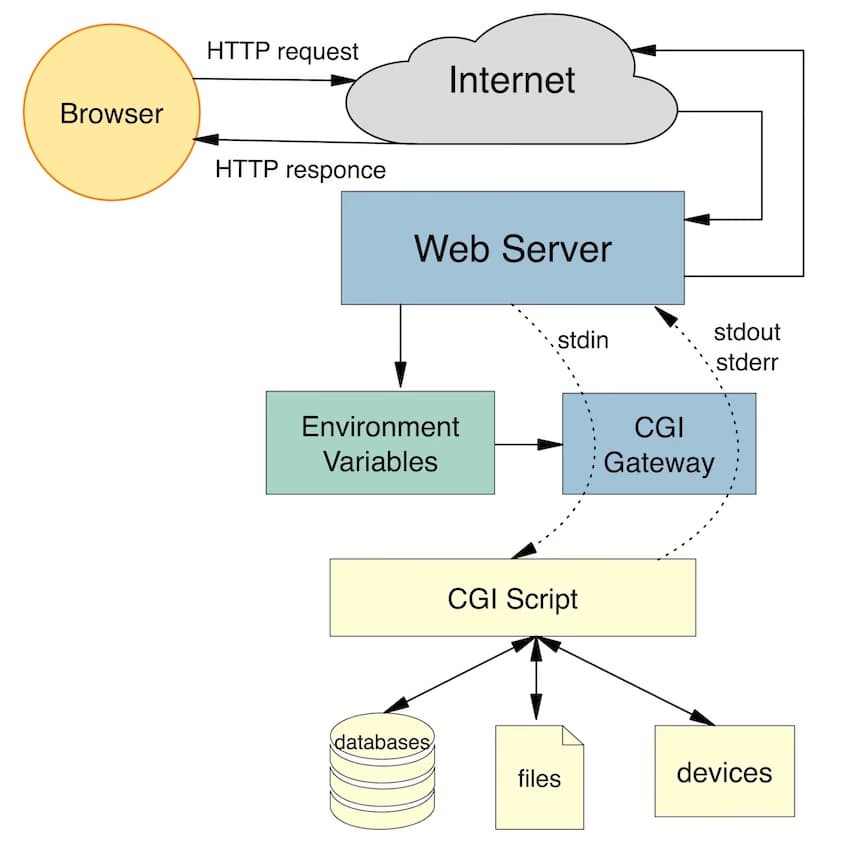
When a client requests a CGI script:
- The server forks a child process
- Sets up environment variables (REQUEST_METHOD, QUERY_STRING, etc.)
- Redirects the script's stdout to a pipe
- Executes the script
- Reads the output and sends it back to the client
// Simplified CGI execution
pid_t pid = fork();
if (pid == 0) {
    // Child process
    setenv("REQUEST_METHOD", request.method.c_str(), 1);
    setenv("QUERY_STRING", request.query_string.c_str(), 1);
    setenv("CONTENT_LENGTH", std::to_string(request.content.size()).c_str(), 1);

    dup2(pipe_fd[1], STDOUT_FILENO);
    execve("/usr/bin/python3", argv, envp);
}
// Parent process reads from pipe and sends to client
This allows you to write dynamic pages in any language—Python, Perl, Bash, even compiled C++ programs.
HTTP Methods: GET, POST, DELETE
The server implements the three most common HTTP methods:
GET: Retrieving Resources
GET /page.html HTTP/1.1
Host: localhost
The server reads the file from disk and returns it with appropriate headers:
HTTP/1.1 200 OK
Content-Type: text/html
Content-Length: 1234

<html>...</html>
POST: Submitting Data
POST /cgi-bin/upload.py HTTP/1.1
Host: localhost
Content-Type: multipart/form-data; boundary=----WebKitFormBoundary
Content-Length: 12345

------WebKitFormBoundary
Content-Disposition: form-data; name="file"; filename="image.jpg"

[binary data]
------WebKitFormBoundary--
The server passes the request body to a CGI script, which processes it and returns a response.
DELETE: Removing Resources
DELETE /files/document.pdf HTTP/1.1
Host: localhost
The server deletes the file and returns:
HTTP/1.1 204 No Content
Handling Edge Cases and Errors
Building a robust server means handling edge cases:
- Malformed requests: Return 400 Bad Request
- Request too large: Return 413 Payload Too Large
- Method not allowed: Return 405 Method Not Allowed
- File not found: Return 404 Not Found
- Server errors: Return 500 Internal Server Error
The parser validates every byte and can detect:
- Invalid HTTP methods
- Malformed URIs
- Missing required headers
- Incorrect Content-Length
- Invalid chunked encoding
HTTP Cookies: Maintaining State
HTTP is stateless, but cookies allow servers to maintain user sessions. Here's how it works:
Server sets a cookie:
HTTP/1.1 200 OK
Set-Cookie: session_id=abc123; Path=/; HttpOnly
Client sends it back:
GET /profile HTTP/1.1
Cookie: session_id=abc123
I implemented basic cookie support for session management, allowing features like user authentication and shopping carts.
Performance Considerations
Some optimizations I implemented:
- Non-blocking I/O: Using
select()allows handling thousands of connections with a single thread - Keep-Alive connections: Reusing TCP connections for multiple requests reduces overhead
- Efficient parsing: Byte-by-byte state machine parsing avoids unnecessary string allocations
- Static file caching: Reading files into memory once and serving multiple clients
- Timeouts: Closing idle connections frees up resources
Challenges and Lessons Learned
Challenge #1: Partial Reads and Writes
Network I/O is asynchronous. A single send() call might not send all your data, and a single recv() might return partial data. You need to handle this:
// Keep track of how much we've sent
size_t total_sent = 0;
while (total_sent < response.size()) {
    ssize_t sent = send(socket, response.data() + total_sent,
                       response.size() - total_sent, 0);
    if (sent < 0) {
        // Handle error
    }
    total_sent += sent;
}
Challenge #2: HTTP Chunked Transfer Encoding
Some requests use chunked encoding:
POST /upload HTTP/1.1
Transfer-Encoding: chunked

7\r\n
Mozilla\r\n
9\r\n
Developer\r\n
0\r\n
\r\n
Each chunk has a size in hexadecimal, followed by the data. The parser needs to handle this incrementally.
Challenge #3: File Uploads and Multipart Data
Handling multipart/form-data for file uploads is complex. You need to parse boundary delimiters and extract file contents while handling them incrementally.
Testing and Debugging
I used several tools to test and debug:
- Postman: Sending custom HTTP requests
- curl: Command-line testing
- Siege: Load testing with thousands of concurrent connections
- Wireshark: Inspecting raw TCP packets
- Web browsers: Real-world testing
Conclusion
Building a web server from scratch was one of the most rewarding projects I've completed. It gave me deep insights into:
- How the internet actually works at the protocol level
- Why certain design decisions matter (like non-blocking I/O)
- How production servers like NGINX achieve high performance
- The complexity hiding behind simple HTTP requests
If you're interested in systems programming, networking, or just want to understand the web better, I highly recommend building something like this. The knowledge you gain is invaluable.
Key Takeaways
- HTTP is deceptively simple: The protocol looks straightforward, but handling edge cases correctly is challenging
- I/O multiplexing is powerful:
select()allows handling thousands of connections efficiently - State machines are your friend: Parsing protocols incrementally with state machines is the industry standard
- Error handling matters: A robust server gracefully handles malformed input
- Configuration is key: Making behavior configurable makes your server flexible and reusable
Resources
If you want to learn more or build your own server, check out these resources:
- Beej's Guide to Network Programming
- RFC 9110 - HTTP Semantics
- RFC 9112 - HTTP/1.1
- HTTP and CGI Explained
- NGINX Documentation
The full source code is available on GitHub. Feel free to explore, learn, and even contribute!